Increase Item Blueprint Report usability with links to items
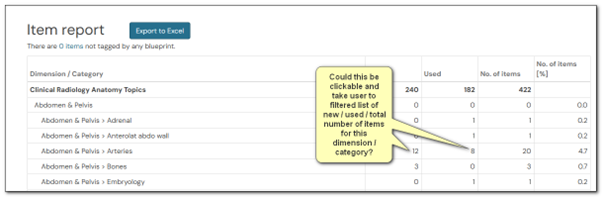
To make the item blueprint report usable, could we please have active links applied to the numbers displayed in the table? (see attached image)
The expected behaviour on clicking a number in the table would be to display in an item list/search view of the items defined by the Dimension/Category and if they are New, Used or Both (No. of Items).
Currently, the Item search filters on dimensions, but there’s no option for New, or Used criteria.
Example:
(See attached image)
The dimension/category is Abdomen & Pelvis > Arteries, and there are 12 New. By clicking the number 12, I should see a list view of the 12 new items tagged with these Dimensions and categories. I would then be able to view and edit individually or apply batch functions to these 12 items.