Ability for users to adjust the exam content layout in A4B
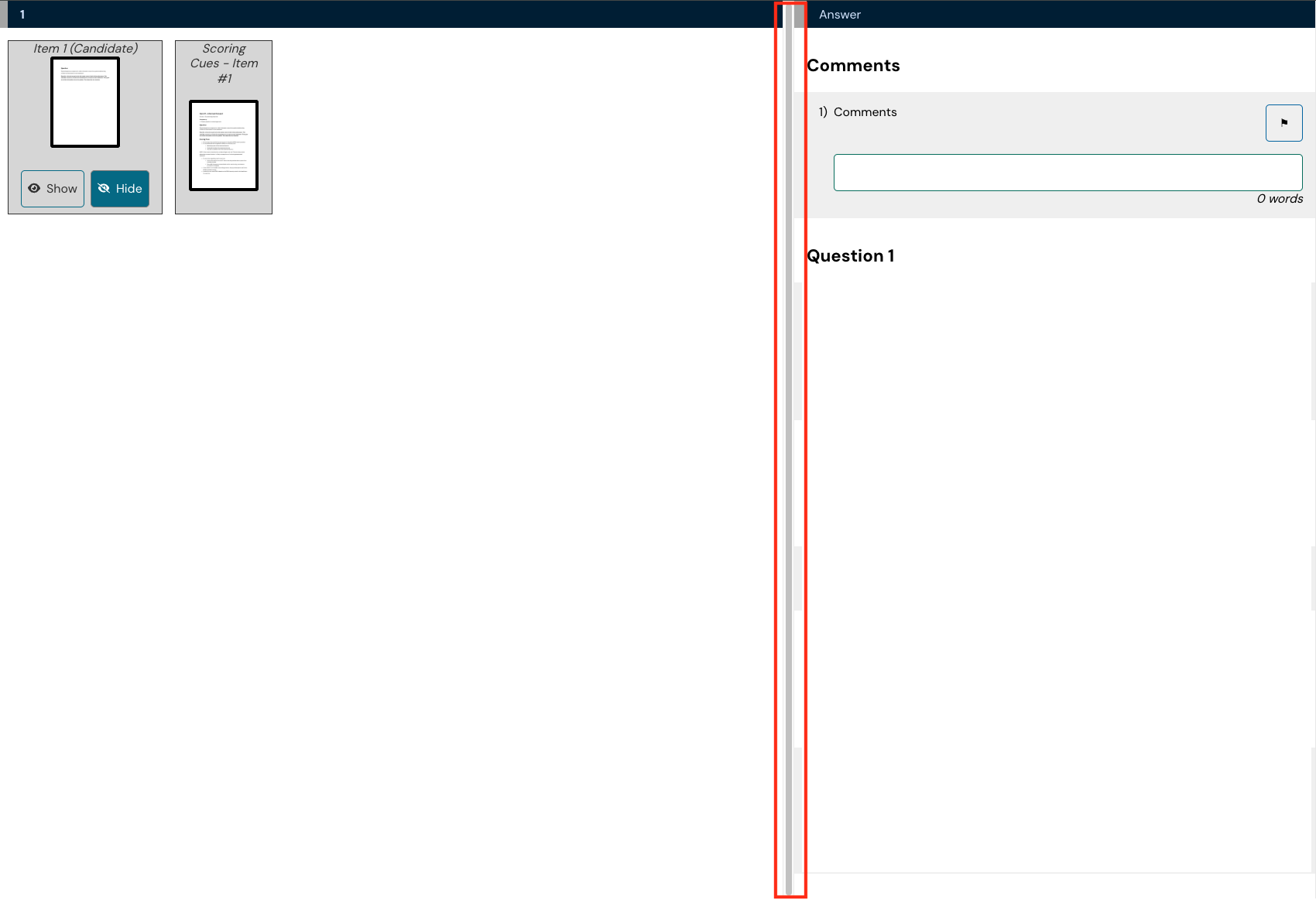
The layout display in A4B (assess for browser) is fixed and does not allow for candidates or examiners to adjust the amount of space provided for the question/answer and any resources.
Provide the ability for users to adjust the layout to adapt to different exam content. Provide a 'grab bar' to allow the user to drag the divider left or right.
Comments: 9
Oldest
•
Newest
•
Most likes
•
Fewest likes
-
28 May, '24
Clare Tredwell MergedMany of our exams require candidates to write lengthy answers to both SAQs and MWQs. The stem itself can occasionally be a single sentence, so the space where it is presented to candidates is much larger than needed while the answer box is extremely narrow by comparison. Some candidates resort to writing their answers in the notes box and copying them over, creating issues with risr not saving their responses. It is also risky if candidates don't copy and paste correctly. We would appreciate the opportunity to re-size the candidate view to allow for greater space for their answers.
-
13 Aug, '25
Georgia Stone MergedWe have received the same feedback from candidates. A slider bar allowing candidates to adjust the space available for answers would be very beneficial.
-
17 Feb
Bron Chandler MergedWritten exam user feedback has requested the option to view images in a 2 X 1 grid, so that candidates could read a question and view the associated images.
We have confirmed the interface our users practice on offers them multiple view options and they are frustrated at the lack of options in the exam viewer.
Is it possible to explore other view options?
See attached file. -
18 Feb
Shelley Martin MergedCurrently, the A4B (Assess for Browser) interface utilizes a fixed ratio for the split-screen view, where the item content (left) and the marksheet (right) occupy a default percentage of the screen. This layout cannot be adjusted by the user. In scenarios where an item contains minimal content (or when the examiner has already reviewed the left-pane resources), the fixed width of the marksheet can feel restrictive. This suggestion can allow the interface to adapt to varying content densities—if there is no information on the left, that screen real estate can be repurposed for scoring.
Suggestions:
1. Implement a central vertical "grab bar" that allows users to slide the divider left or right.
2. Alternatively, provide a "Expand Marksheet" button that shifts the ratio to a 20/80 split. -
03 Mar
Julie - risr/ System"Add more view options in image grid for exam user" (suggested by <Hidden> on 2026-02-17), including upvotes (1) and comments (0), was merged into this suggestion.
-
03 Mar
Julie - risr/ System"Provide more "real estate" for the answer box in MWQ/SAQs" (suggested by <Hidden> on 2024-05-28), including upvotes (18) and comments (1), was merged into this suggestion.
-
03 Mar
Julie - risr/ System"A4B – Enable Resizable/Adjustable Marksheet Split-View" (suggested by <Hidden> on 2026-02-18), including upvotes (1) and comments (0), was merged into this suggestion.
-
02 Apr
Darnley Small MergedThe ability for Candidate to adjust the screen layout while in an Exam
Use Case:
As a Candidate, I want to be able to adjust the size of the Question and Answer panes in the Exam, so that I can see all of the relevant information, without the need to keep scroll up and down the screen.
I may have written a large amount of text into the free text field which has pushed the information on the screen down. If I could re-size the Answer Pane, then I would be able to see what I have written above, to help ensure I'm not repeating myself in the next section of the question -
14 Apr
Julie - risr/ System"Allowing Candidates to adjust the screen layout or size during an Exam" (suggested by <Hidden> on 2026-04-02), including upvotes (1) and comments (0), was merged into this suggestion.
 Change_grid_options_in_image_viewer_kauldd.pdf